
How to Crop Fashion Photos Without Losing the Details That Matter
A fashion photograph has several jobs to do. It introduces a silhouette, communicates the mood of a collection, and gives viewers information about how a garment sits on the body. Cropping influences all three. A tighter frame can emphasize tailoring or texture, while a wider composition shows how separate pieces work together. For designers, photographers, and online retailers, choosing the right boundaries is an important part of presenting clothes clearly.
Decide What Each Image Needs to Show
Before adjusting a frame, identify its purpose. A collection’s opening photograph might establish an atmosphere through location and styling. A product image needs to make the garment easy to examine. A detail photograph can concentrate on embroidery, a fastening, or the way a fabric folds. These images belong to the same visual story, but they require different decisions.
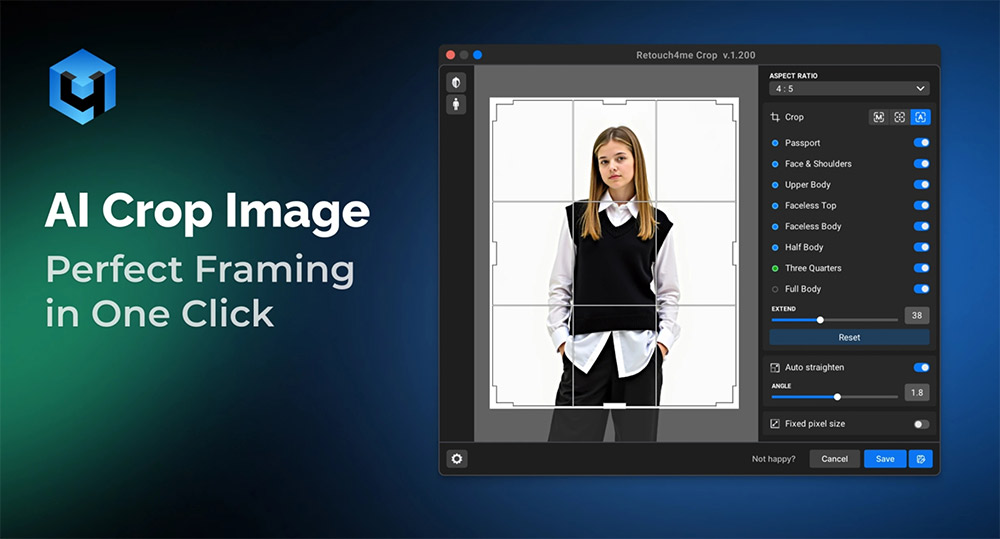
An ai crop image tool can suggest framing based on the subject’s position and a chosen format. In fashion photography, those suggestions need checking against the clothing itself. A composition that centers a face neatly might exclude the cuffs, hem, or accessory that the photograph was intended to showcase.
Give each selected image a clear role before editing. For a tailored jacket, that could mean one view showing its overall length, another revealing the back, and a closer frame for lapel construction. This makes it easier to judge whether a crop preserves useful information or simply creates a more striking thumbnail.
Protect the Silhouette and Construction Details
The edges of a photograph can change how viewers understand an outfit. Cutting just above a trouser hem removes information about length and how the fabric meets the shoe. Cropping the bottom of a coat may obscure its proportions. A sleeve disappearing at the edge can leave the shape of the garment unclear.
Full-length images benefit from enough space to show the entire outfit comfortably. Check the top, bottom, and both sides of the frame, especially when a model is moving. A swinging bag or extended sleeve may reach farther than expected.
Closer compositions should have an equally deliberate focus. If the subject is a jacket’s fastening, include enough surrounding fabric to show where it sits. If the image highlights a necklace, consider whether the neckline provides useful styling context.
Pay attention to hands and joints as well. A frame ending exactly at a wrist or knee can look abrupt. Moving the boundary slightly may produce a more resolved composition while preserving the intended emphasis. Review the clothing and the pose together.
Build Consistency Across a Collection
When images appear beside one another, differences in scale become noticeable. One model may fill the frame while another looks distant. Uneven space above heads or below shoes can make a product grid feel unsettled, even when each photograph works individually. Establish a few framing conventions for comparable images. Full-length views might share similar margins, while waist-up photographs follow a separate standard. Consistency is easier to maintain when these categories are defined before processing a large selection.
Allow exceptions where the design requires them. A wide skirt, long train, or oversized sleeve needs room to remain visible. Forcing every garment into identical boundaries can hide the qualities that distinguish the collection. Review a contact sheet or sample page as you work. Seeing several photographs together helps reveal changes in scale and alignment. Automated cropping can provide initial versions, but the final selection should reflect both the layout and the shape of each outfit.
Prepare Separate Crops for Different Uses
A portrait-oriented lookbook page, a square product tile, and a wide website banner ask different things of the same photograph. Trying to make one crop serve every placement can leave important details outside the visible area. Plan likely formats before the shoot where possible. Capture some compositions with additional space around the model, and include horizontal options when a website banner is part of the brief. Space reserved for a headline should be considered during photography and layout.
During editing, preserve the original file and save versions for each intended use. Check how images appear in the actual page or template, including smaller screen layouts that may crop them again. Cropping also reduces the number of pixels available. A small detail taken from a wider photograph may suit a modest online placement but lack sufficient resolution for a large print.
Effective cropping gives fashion photography a clear purpose. It preserves the silhouette, directs attention to meaningful details, and helps a collection read coherently across different layouts. Technology can assist with repetitive framing decisions, while careful review ensures that the finished photographs communicate the clothes as thoughtfully as they were designed.
Hits: 64 | Leave a comment
Tags:photographs, AI, crop image
About the Author

Silvia Kabaivanova
As the founder of Be Global Fashion Network and several other fashion websites, Silvia has been working for more than 20 years covering fashion industry trends and news. With a passion for the fashion business, she focuses on sustainable fashion and innovations, custom fashion and print on demand services. Silvia is a Chairman of Bulgarian Fashion Association. You can reach her at silvia@bgfashion.net